Motivation
Another way of implementing lists is to make our class realize the ICollection interface.
Quoting C# 12 in a Nutshell:
ICollection<T>is the standard interface for countable collections of objects. It provides the ability to determine the size of a collection (Count), determine whether an item exists in the collection (Contains), copy the collection into an array (ToArray), and determine whether the collection is read-only (IsReadOnly).
Its UML diagram is as follows:
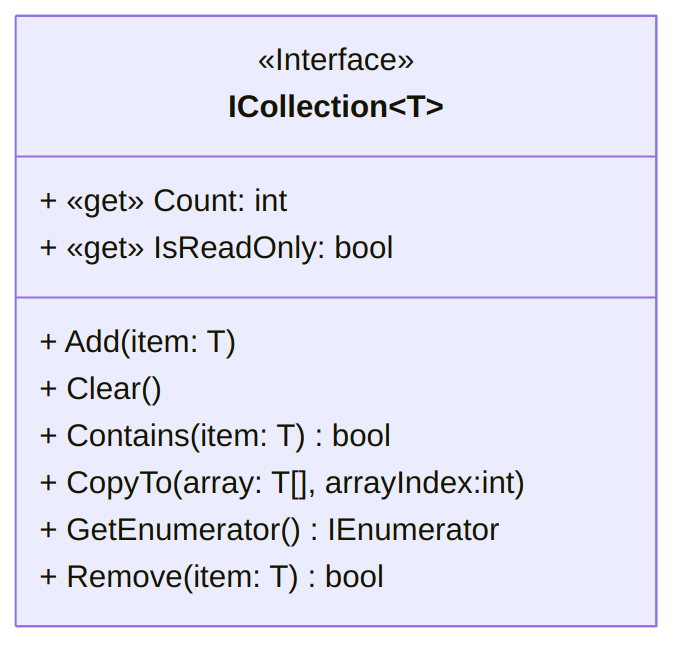

Providing a way of constructing a IEnumerator<T> object let C# iterate
over our custom lists using foreach, so that we can for example write
    foreach (var item in myList1)
    {
      Console.Write(item + " ");
}for myList1 a CList<int> object.
Implementing interfaces is an excellent way of signaling to C# that our class respects certain convention on one hand, and to help programmer follow usual guidelines on the other.
Implementation
In addition to signaling that our class realizes the interface, using
public class CList<T> : ICollection<T>, we need to implement the
following properties and methods:
  public int Count
  {
    get
    {
      int size = 0;
      Cell cCell = first;
      while (cCell != null)
      {
        cCell = cCell.Next;
        size++;
      }
      return size;
    }
  }

  public bool isReadOnly = false;
  // This attribute is not required by the interface,
  // but convenient to have.
  public bool IsReadOnly
  {
    get { return isReadOnly; }
    set { isReadOnly = value; }
    // Note that set is not required by the interface
  }

  // Add is simply "AddF", slightly revisited
  // to account for IsReadOnly attribute.
  public void Add(T value)
  {
    if (isReadOnly)
    {
      throw new InvalidOperationException(
        "List is read-only."
      );
    }
    first = new Cell(value, first);
  }

  public void Clear()
  {
    first = null;
  }

  public bool Contains(T value)
  {
    bool found = false;
    Cell cCell = first;
    while (cCell != null && !found)
    {
      if (cCell.Data.Equals(value))
      {
        found = true;
      }
      cCell = cCell.Next;
    }
    return found;
  }

    // Copies the elements of the ICollection to an Array, starting at a particular Array index.
  public void CopyTo(T[] array, int arrayIndex)
  {
    if (array == null)
      throw new ArgumentNullException(
        "The array cannot be null."
      );
    if (arrayIndex < 0)
      throw new ArgumentOutOfRangeException(
        "The starting array index cannot be negative."
      );
    if (Count > array.Length - arrayIndex)
      throw new ArgumentException(
        "The destination array has fewer elements than the collection."
      );

    Cell cCell = first;
    int i = 0; // keeping track of how many elements were copied.
    while (cCell != null)
    {
      array[i + arrayIndex] = cCell.Data;
      i++;
      cCell = cCell.Next;
    }
  }

    public IEnumerator<T> GetEnumerator()
  {
    Cell cCell = first;
    while (cCell != null)
    {
      yield return cCell.Data;
      cCell = cCell.Next;
    }
  }

  IEnumerator IEnumerable.GetEnumerator()
  {
    return this.GetEnumerator(); // call the generic version of the method
}The technical role of the yield
keyword
is not really important: the main thing to understand is that we are
constructing a way for C# to iterate over elements in our custom list in
the GetEnumerator method.